Catch camera problems. Before the footage lets you down.
A camera can be online and still miss what matters. Scheduled AI checks help find blocked views, shifted cameras, image faults, and incorrect timestamps—so you can investigate before you rely on the footage.
✓ Scheduled checks included with every Angelcam plan
Online doesn’t mean a usable viewANGELCAM AI
Video defect detectionIllustrative check
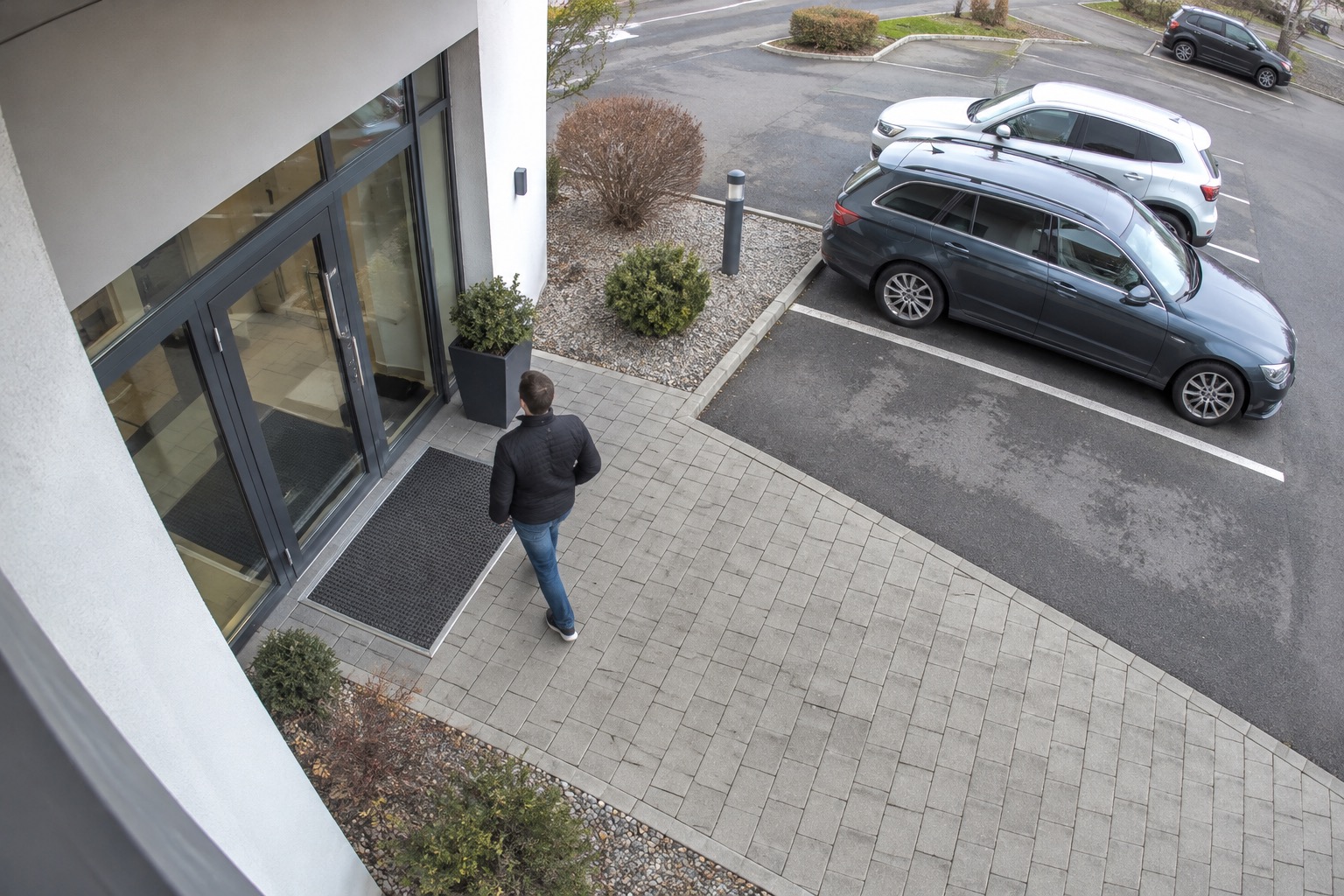
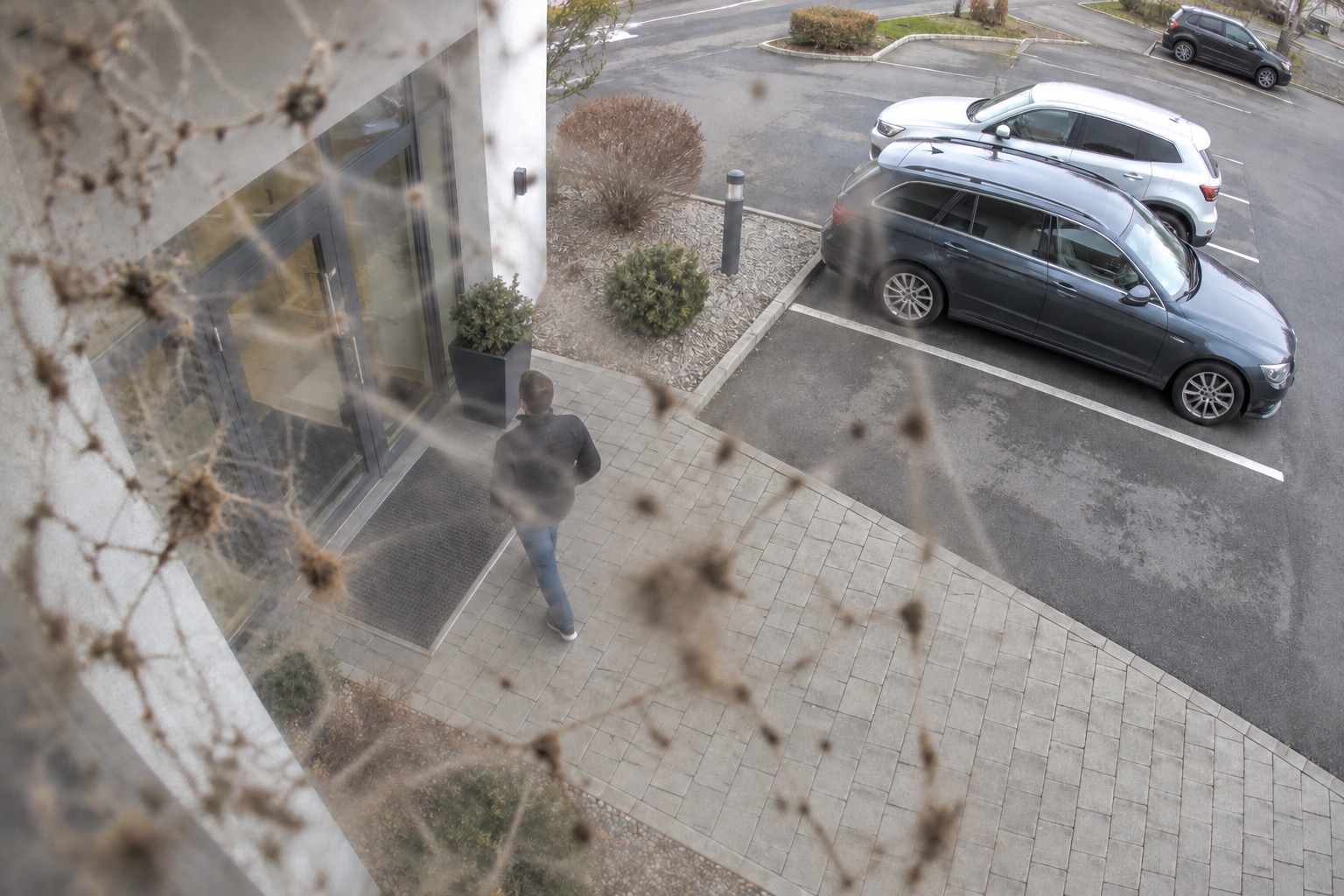
Entrance cameraView obstructed
REFERENCE Clear view
THIS CHECK Simulated obstruction
⌖
The camera is online. Part of the view is blocked.
Spider web and grime obscure the entrance. Review the comparison to decide whether the lens needs cleaning.
Auto-rotate · every 2 seconds
Try an example
AI-generated illustrative scene. Defects and results are simulated.
⌖
Know what needs attention—and why.Compare the views. Review the finding. Decide on the fix.
✓ AI checks. You stay in control.
4types of video defects
95%measured accuracy*
$0.02per pay-as-you-go check
Less manual checking. Fewer unnoticed faults.
Included checks every month
Essentials: 10 checks
Professional: 50 checks
Business: 200 checks
Flex: 200 checks
Every check runs all 4 defect detections together on one camera.
LOOK BEYOND CONNECTION STATUS
Four ways your camera can let you down.
See the image problems a connection indicator can’t tell you about. Compare a useful view with one that needs attention.
01 / POSITION
Is it still looking the right way?
REFERENCE VIEW
Entrance visibleBOUTIQUE / CAM 01
CAMERA MOVED
Entrance out of frameBOUTIQUE / CAM 01
!
Camera turned. Entrance coverage lost.
The camera now points toward the checkout and shelves. The entrance is no longer visible.
Camera position
02 / VISIBILITY
Is the view clear?
CLEAR VIEW
ENTRANCE / CAM 02
LENS OBSTRUCTED
ENTRANCE / CAM 02
!
View obstructed
An obstruction covers part of the lens. Important details are hidden.
Visibility
03 / SENSOR
Does the image look right?
NORMAL IMAGE
STOCKROOM / CAM 03
IMAGE ARTIFACTS
STOCKROOM / CAM 03
!
Image artifacts
Colored bands disrupt the image. The camera sensor needs a closer look.
Sensor status
04 / TIME
Is the camera time correct?
EXPECTED TIME
14:32:10CAFÉ / CAM 04
CAMERA TIME
02:32:10CAFÉ / CAM 04
!
Timestamp mismatch
The camera clock is 12 hours behind the expected time in this example.
Camera time
AI-generated illustrative scenes. Defects and timestamps are simulated.
THE PROBLEMS BEHIND A BAD VIEW
Your cameras have a job. A bad image gets in the way.
Whatever you use cameras for, you need a useful view and a practical way to keep it that way.
01 / LOST VISIBILITY
“It was online. We thought it was fine.”
A blocked lens, changed angle, or damaged image can leave you with footage that misses the detail you need.
Check the image, not just the connection.02 / TIME SPENT CHECKING
“We can’t keep opening every feed.”
Routine checks take time. And a quick glance can miss a change in framing or a timestamp that is wrong.
Let scheduled AI checks take the first look.03 / GUESSWORK BEFORE A FIX
“What changed—and what needs fixing?”
A fault is easier to investigate when you can see it. Review the images and explanation before deciding what action to take.
Start with visual evidence.
04 / COVERAGE LOST AFTER A CHANGE
“The entrance is no longer in frame.”
A camera can be knocked or moved during cleaning or maintenance. It keeps recording, but the doorway or area you rely on is no longer visible.
Compare the current view with your reference.
05 / A VIEW THAT GETS WORSE
“The lens needed cleaning weeks ago.”
Dust, grime, or a spider web can build up between visits. You may only notice when you open the feed and find that important details are obscured.
Find an obstructed view before it stays that way.
06 / FOOTAGE AT THE WRONG TIME
“The event happened at 2. Why can’t I find it?”
An incorrect camera timestamp makes it harder to locate an event or line up footage from different cameras. The video is there, but the clock sends you to the wrong moment.
Spot timestamp issues before reviewing footage.
FROM CHECK TO CLARITY
Let AI take the first look. You make the call.
Use the image comparison and explanation to assess the fault before deciding on maintenance. Confirm or correct the AI’s verdict, and keep the final judgment with your team.
*95% measured accuracy in results collected so far. We’ll update this figure as more results become available. AI results can be incorrect and should be reviewed.
01
Check your cameras
Each check runs all four defect detections together on one camera: position, visibility, sensor status, and camera time. Monthly checks are included in your plan.
02
See what changed
View reference and current images side by side, with a result and explanation for each detection.
03
Confirm or correct
Review the findings and mark each verdict as correct or wrong. Keep the final judgment in your hands.
SIMPLE, FLEXIBLE PRICING
Start with your plan. Check more as you need.
One check. All four defect detections at the same time. Every check assesses one camera’s position, visibility, sensor status, and timestamp together.
Essentials
10 checks
Included per month
Included in your planAll 4 detections in every check
Then pay as you go
Professional
50 checks
Included per month
Included in your planAll 4 detections in every check
Then pay as you go
Business
200 checks
Included per month
Included in your planAll 4 detections in every check
Then pay as you go
Flex
200 checks
Included per month
Included in your planAll 4 detections in every check
Then pay as you go
One check covers one camera and all four defect types together. Additional checks cost $0.02 each.Compare Angelcam plans ↗
$0.02 / check
A FEW MORE DETAILS
Good to know.
Will this tell me when a camera goes offline?
Video defect detection checks the camera image for position, visibility, sensor, and time issues. Use camera connectivity monitoring for offline cameras. Together, these checks help you assess whether a camera is connected and whether its view is usable.
What happens after my included checks?
Additional checks cost $0.02 each, or $20 per 1,000 checks. Each check runs all four defect detections together on one camera. The minimum credit top-up is $10.
Does one check include all four defect detections?
One check runs all four defect detections at the same time on one camera: camera position, visibility, sensor status, and camera time. It uses one check from your allowance. Essentials includes 10 checks per month, Professional 50, Business 200, and Flex 200. Additional checks cost $0.02 each.
How accurate is video defect detection?
Video defect detection has achieved 95% measured accuracy in results collected so far. We’ll update this figure as more results become available. You can review the evidence and confirm or correct each verdict.
Can I review the AI’s findings?
Yes. The review interface shows reference and current images, individual detection results, and explanations. You can mark a verdict correct or wrong.


 Entrance visibleBOUTIQUE / CAM 01
 Entrance out of frameBOUTIQUE / CAM 01